Your Workflow May Be a 20-Year-Old Water Heater (And It’s Time to Redesign It)
Your Workflow May Be a 20-Year-Old Water Heater (And It’s Time to Redesign It)
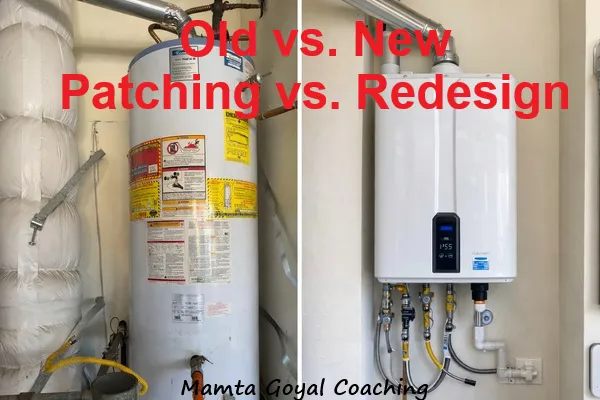
Last week, our water heater finally gave up.
Not with drama.
Just… done.
That’s how aging things fail. You tolerate the strange noise. You patch the small leak. You keep saying, “We’ll replace it later.”
Teams do the same with workflows.
They still deliver. They still ship. But underneath, the workflow is held together with workarounds, extra checks, and “ask Sam, he knows.” It functions—until the day it doesn’t.

Workflow decay isn’t new. What’s different now is the pace:
More dependencies, more tools, more stakeholders
Faster expectations (“same quality, half the time”)
More interruptions and context switching (which drives stress even when output stays “fine”)
AI is showing up inside teams—often before the workflow is ready for it
So the same old problem (workflow decay) shows up faster—and hurts more.
Workflow decay: the slow build-up of “just one more step”
Workflows rarely break in one moment. They collect scar tissue.
Every time something goes wrong, teams add one more layer:
another review
another approval
another meeting
another tracker
another “quick status” ping
Each addition makes sense locally.
Together, they create a workflow that costs too much to run.
Like an old water heater: patch, ignore, postpone… repeat.
The hard truth
Cleaning won’t fix what age has broken.
A better checklist. Another template. One more meeting.
That’s like flushing a dying water heater and hoping it becomes new.
Sometimes you don’t need “improvement.”
You need replacement (a redesign of the critical path).
One decision rule: patch, refactor, or replace?
Ask these 3 questions:
Is the environment different now?
Scale, customers, AI tools, team size, performance expectations, compliance.Are we spending more time maintaining than delivering?
Rework, approvals, status chasing, “where is it?”If this system stopped tomorrow, would we be stuck?
Single points of failure, heroics, tribal knowledge.
If you answer “yes” to any two:
✅ Stop patching. Plan the replacement.
What “replacement” looks like (without boiling the ocean)
You’re not rewriting everything. You’re redesigning the critical path.
1) Map the workflow on one page
Boxes and arrows:
trigger → steps → handoffs → definition of done
If it can’t fit on one page, it’s probably too complex to run reliably.
2) Pick only the top 2–3 friction points
Ask:
Where do we wait?
Where do we redo work?
Where do decisions get re-litigated?
Where do we lose context?
Quick note: stale or duplicate data often hides here. When teams don’t trust the numbers, they add “verification steps,” which quietly slows everything down.
3) Redesign for today (and make AI do real work)
You’re right to want more than “document writing.” Here are AI upgrades that actually remove time, risk, or bottlenecks:
A) Triage + routing (reduce “where should this go?”)
Auto-classify incoming bugs/incidents/requests
Suggest likely duplicates
Route work to the right owner based on components and history
B) Quality at the start (reduce rework)
Flag ambiguous acceptance criteria
Generate test ideas and edge cases from requirements
Catch missing inputs before work starts
C) Faster decisions (reduce meeting load)
Propose options with tradeoffs based on constraints you define
Highlight what data is missing so you don’t debate in circles
Draft a decision record with assumptions + risks (so context doesn’t vanish)
D) Operational detection (reduce surprises)
Spot anomalies in logs/metrics
Summarize incidents into probable causes + next checks
Recommend runbook steps based on similar past incidents
The rule stays the same:
Humans own judgment. AI reduces friction and rework.
4) Pilot for 2 weeks
One team. One slice of the workflow. One goal (speed, quality, or load).
5) Roll out with one owner
one-page “how it works”
2–3 examples of good outputs
short office hours window
one accountable owner for adoption
What to say to engineers
Sell outcomes:
fewer interruptions
less rework
fewer status meetings
clearer ownership
faster decisions
Try:
“Let’s reduce friction.”
“Let’s make the default path easier.”
“Let’s remove steps that don’t earn their keep.”
A quick “is it due?” checklist
If you see 3+ of these in a week, the workflow is aging out:
People ask for status more than they read status
Work gets stuck at the same step repeatedly
Exceptions are more common than the standard path
“Ask Sam” is the workflow
The same mistakes repeat sprint after sprint
That’s not a motivation issue.
That’s workflow design debt.
The water heater lesson
When our water heater died, we could patch again… or replace it and stop worrying.
Patch feels cheaper—until you count the real costs: time, stress, and repeat failures.
Same with workflows.
Refactoring helps…
…but sometimes the world has moved on.
What’s one workflow you’d replace this quarter if you could? 🔧
References (links)
Gloria Mark (2008). The Cost of Interrupted Work: More Speed and Stress. (CHI paper, UC Irvine)
Microsoft & LinkedIn (2024). Work Trend Index: The state of AI at work.
DAMA NL (2020). Dimensions of Data Quality (includes timeliness/consistency concepts).